
During our testing, we completed the registration process using the Australian version of the website. The sign-up window appeared as a pop-up over the homepage and requested standard personal information, including an email address, password, country, preferred currency, date of birth and Australian mobile number. Before submitting the application, users must also confirm that they are at least 18 years old and agree to the Privacy Policy together with the Terms and Conditions.
This guide explains the complete Lukki casino registration process, describes every field displayed during sign-up and outlines what happens after creating an account, including email confirmation, identity verification and activation of the available welcome offers.
| Registration Essentials | Details |
|---|---|
| Official website | Lukki.com |
| Minimum age | 18+ |
| Country selection | Australia available |
| Account currency | AUD |
| Registration method | Email address |
| Phone number | Australian +61 format |
| Email confirmation | Required after registration |
| Casino & Sports | Single account |
| Welcome package | Available after eligible deposits |
| Verification | May be requested before withdrawals |
| Desktop support | Yes |
| Mobile support | Yes |
How to create a Lukki account
The registration process has been designed to collect the information required for account creation while keeping the number of mandatory fields relatively small. During our testing, the entire form fitted inside a single registration window and could be completed within a few minutes using standard account information.
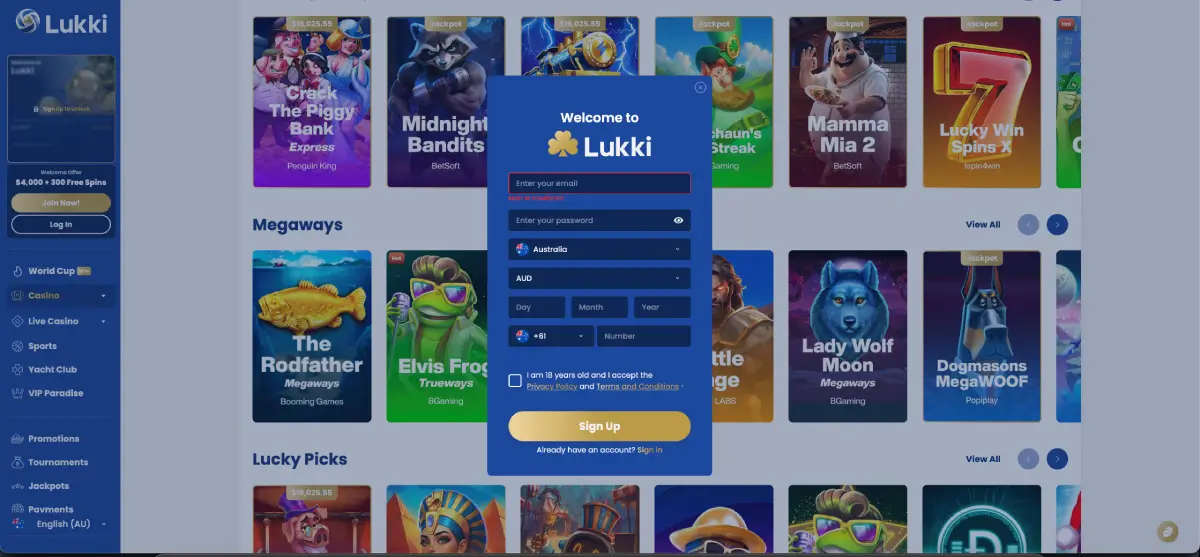
Users should prepare a valid email address, an Australian mobile number and decide which account currency they intend to use before starting the process. Choosing the correct information from the beginning helps prevent delays if verification becomes necessary later.
Step-by-step Lukki registration
- Visit the official Lukki website.
- Select the Sign Up or Join Now button.
- Enter your email address.
- Create a secure password.
- Select Australia from the country list.
- Choose AUD as your account currency.
- Enter your date of birth.
- Provide an Australian mobile number using the +61 country prefix.
- Confirm that you are at least 18 years old.
- Accept the Privacy Policy and Terms & Conditions.
- Select Sign Up to submit the registration.
Once these steps have been completed, Lukki creates the account and begins the email confirmation process. Depending on the current security settings, users may need to verify their email address before accessing all account functions.
Understanding every registration field
Although the registration form is relatively short, every field plays an important role in account management, payment processing and identity verification. Entering accurate information from the beginning helps reduce the likelihood of delays during withdrawals or security reviews.
Email address
The email address becomes the primary identifier for the account. It is used for logging in, password recovery, security notifications and communication regarding account activity. During testing, the registration form accepted a standard email format and required users to enter a valid address before continuing.
It is important to use an inbox that you control permanently. Temporary email services or addresses that are rarely monitored may create problems if password recovery or identity verification becomes necessary in the future.
Password
The password protects access to the account and should be unique. Rather than reusing credentials from social media, banking or other gambling websites, users should create a password specifically for their Lukki account.
A strong password generally combines:
- Uppercase and lowercase letters.
- Numbers.
- Special characters where supported.
- A length that is difficult to guess.
Simple combinations such as birthdays, names or repeated number sequences should be avoided because they are easier to compromise.
Country selection
During our session, the registration form included a country selector where Australia could be chosen. Selecting the correct country helps configure the account appropriately and may influence available payment methods, currency options and certain promotional campaigns.
Changing country information later can require additional verification, so users should review the selection carefully before submitting the registration.
Choosing AUD
Australian players normally benefit from selecting AUD during registration because deposits, withdrawals and account balances can then be managed using Australian Dollars where supported by the platform.
Using the preferred local currency may also reduce unnecessary exchange-rate conversions when funding the account with Australian payment methods.
Date of birth
The registration form requires the user's complete date of birth. This information confirms eligibility under the platform's age requirements and forms part of later verification checks if identification documents are requested.
Users should never guess or modify this information simply to complete the form more quickly.
Australian mobile number
The mobile field displayed the Australian +61 prefix during our testing. Entering the correct telephone number helps support staff contact the account holder if necessary and may also be used for security purposes.
If the number changes after registration, users should update their profile before requesting withdrawals or important account changes.
Email confirmation after registration
Submitting the registration form does not necessarily complete every stage of account activation. During our testing of the Australian registration flow, Lukki requested a valid email address, indicating that account communication is handled through the registered inbox. Depending on the current security settings, new members may be asked to confirm their email before using every account feature.
Email confirmation serves several purposes. It proves that the account holder controls the address entered during registration, allows password recovery to function correctly and provides a secure communication channel for important account notifications.
Typical email confirmation process
- Complete the registration form.
- Submit the application.
- Open the email inbox used during registration.
- Locate the confirmation message.
- Check spam or junk folders if necessary.
- Open the confirmation email.
- Select the verification link.
- Return to Lukki and complete your first login.
If the email cannot be located after several minutes, avoid creating another account immediately. Instead, confirm that the address entered during registration was correct before contacting customer support.
Your first Lukki login after registration
Once registration has been completed successfully, users can sign in using the email address and password selected during account creation. The first login unlocks the personal account dashboard, payment settings, promotional pages and all gaming categories available to Australian users.
During our testing, the same account worked across every visible section of the website without requiring additional registration. After signing in, we could move directly between:
- Casino
- Live Casino
- Sports
- Promotions
- Tournaments
- Jackpots
- Yacht Club
- VIP Paradise
- Payments
This unified account structure means players do not need separate credentials for casino gaming and sports betting.
Welcome offers after registration
Creating an account does not automatically credit bonus funds. Registration simply makes the account eligible to participate in promotional campaigns that require qualifying deposits.

At the time of our testing, new Australian users could access a welcome package worth up to AUD 4,000 plus 300 Free Spins spread across four qualifying deposits.
| Deposit | Reward | Bonus Code |
|---|---|---|
| First Deposit | 100% up to AUD 500 + 100 Free Spins | Not required |
| Second Deposit | 100% up to AUD 500 + 50 Free Spins | LUKKI2 |
| Third Deposit | 50% up to AUD 1,000 + 50 Free Spins | LUKKI3 |
| Fourth Deposit | 25% up to AUD 2,000 + 100 Free Spins | LUKKI4 |
Lukki also advertises a separate VIP First Deposit promotion for qualifying users depositing at least AUD 500. Because promotions can change over time, players should always review the current bonus conditions before making a qualifying deposit.
Identity verification after registration
Not every account requires verification immediately after sign-up. However, identity checks may become necessary before withdrawals or when additional security reviews are triggered.
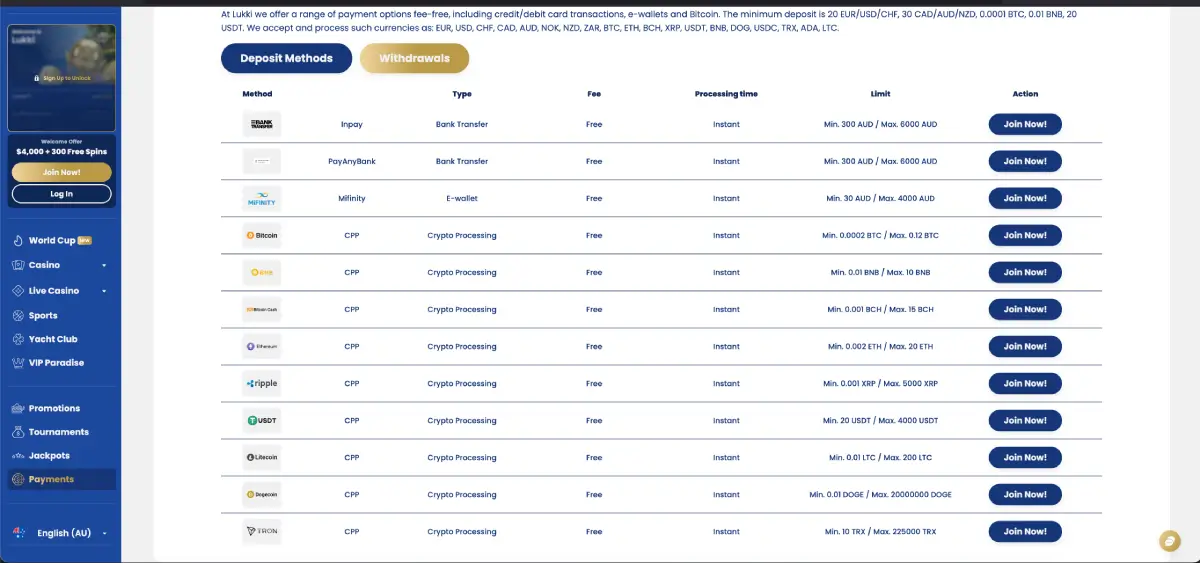
The purpose of Know Your Customer (KYC) procedures is to confirm that the registered account belongs to the individual using it while helping prevent fraud and duplicate registrations.
Documents that may be requested
- Passport.
- Australian driver's licence.
- Government-issued photo identification.
- Recent utility bill.
- Bank statement.
- Evidence of ownership for the selected payment method where applicable.
Submitting clear, readable documents that match the information entered during registration generally helps reduce processing times.
Common registration problems
Email address already registered
If Lukki reports that the email address is already in use, it usually means an account has previously been created using that address. Instead of opening another account, users should attempt a password reset.
Weak password
Passwords that do not satisfy the platform's security requirements may need to be strengthened before registration can continue.
Country selected incorrectly
Selecting the wrong country during registration can affect currency options and account information. Review every field carefully before submitting the application.
Incorrect date of birth
The date of birth entered during registration should always match official identification documents. Incorrect information may delay verification later.
Phone number mistakes
Australian players should check that the +61 country code and the remainder of the mobile number have been entered correctly.
Registration security recommendations
Protecting a newly created account is just as important as creating it correctly.
- Create a password used only for Lukki.
- Protect your email account with a strong password.
- Do not share login credentials.
- Avoid registering over unsecured public Wi-Fi.
- Keep your browser and operating system updated.
- Review account activity regularly.
Helpful tips for Australian players
- Select AUD during registration if you intend to deposit in Australian Dollars.
- Use an active Australian mobile number.
- Complete email confirmation before making your first deposit.
- Read bonus conditions before claiming promotional offers.
- Keep copies of verification documents ready if withdrawals are planned.
- Use only one personal Lukki account.
Frequently Asked Questions
Can I register from Australia?
Australia appears in the country selection menu and AUD is available during the registration process.
How long does Lukki registration take?
Completing the registration form usually takes only a few minutes, provided all required information is available.
Can I use one account for casino and sports betting?
Yes. A single Lukki account provides access to both casino products and the sportsbook.
Do I need to verify my email?
Email confirmation may be requested after registration to activate the account and support future password recovery.
Will I need KYC verification?
Identity verification may be requested before withdrawals or during additional security reviews.
Can I change my account currency later?
Because currency changes may not always be available after registration, Australian users should carefully select AUD if that is their preferred account currency.
Can I create another account if I make a mistake?
If registration details need to be corrected, it is generally better to contact customer support than create a duplicate account.